

Discount Code Reports allow you to track how a specific discount code has been used. You can view details such as which clients used the code, when it was applied, the original price, the discount amount, taxes, tips, and the final paid amount. This helps you understand the effectiveness and usage patterns of your discount campaigns.
Viewing Discount Code Reports
Click on Admin Panel.
Click on Discount Codes.
Select the discount code for which you want to see the report.
Open the Reports tab.
You will see a list of all bookings where the selected discount code was used.
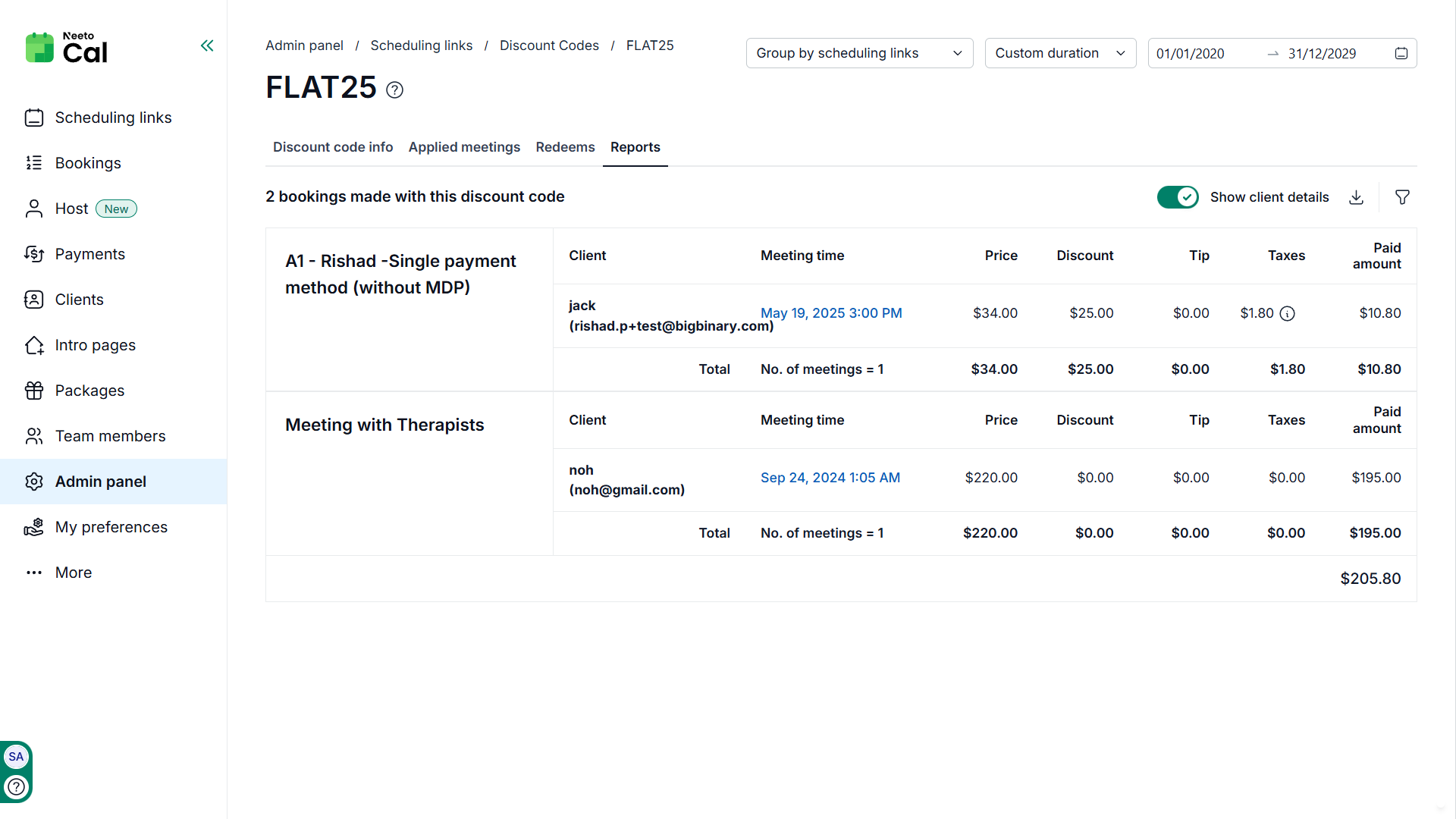
Information available in Reports
Each entry in the report provides the following details:
Scheduling link / Meeting type: The booking link through which the meeting was scheduled.
Client: Name and email address of the client who used the discount code.
Meeting time: The date and time of the scheduled meeting.
Price: The original meeting price before applying the discount.
Discount: The amount deducted using the discount code.
Tip: Any tip added by the client during payment.
Taxes: Taxes applied to the booking, if applicable.
Paid amount: The final amount paid by the client after applying discounts, taxes, and tips.
At the bottom of the table, totals are displayed to help you quickly understand overall usage and revenue impact.
Filtering and organizing reports
You can refine the report using the available options:
Group by scheduling links / Group by clients: Organizes usage based on the booking links or by clients where the discount code was applied.
Date range filter: Allows you to view usage within a specific time period (for example, last week, last month, or last year).
Show client details: Toggle this option to display or hide client information for a cleaner view when analyzing financial data.
These filters help you analyze trends, compare performance across scheduling links, and measure the success of promotions over time.
When to use Discount Code Reports
Discount Code Reports are useful when you want to:
Track how many times a discount code has been used.
Identify which clients have redeemed a code.
Measure how much revenue was reduced through discounts.
Compare performance of promotional campaigns.
Analyze booking trends linked to specific discount offers.
Discount Code Reports provide a clear view of how your promotions are performing and help you make informed decisions about future pricing and marketing strategies.