

This feature allows one client to book multiple spots in a group meeting with a single booking. This is useful when a client wants to bring colleagues, family members, or friends to a group session. For example, a company might want to book 3 spots for their team members in a workshop, or a parent might want to book 2 spots for their children in a group class.
Instead of making separate bookings for each person, the client can select the number of spots they need and complete the booking process once.
Enabling multi-spot booking
By default, this feature is not enabled. You need to follow these steps to enable it:
Click on your scheduling link.
Find the Maximum group size per slot setting.
-
Check the setting Allow one client to book multiple spots in the same meeting.
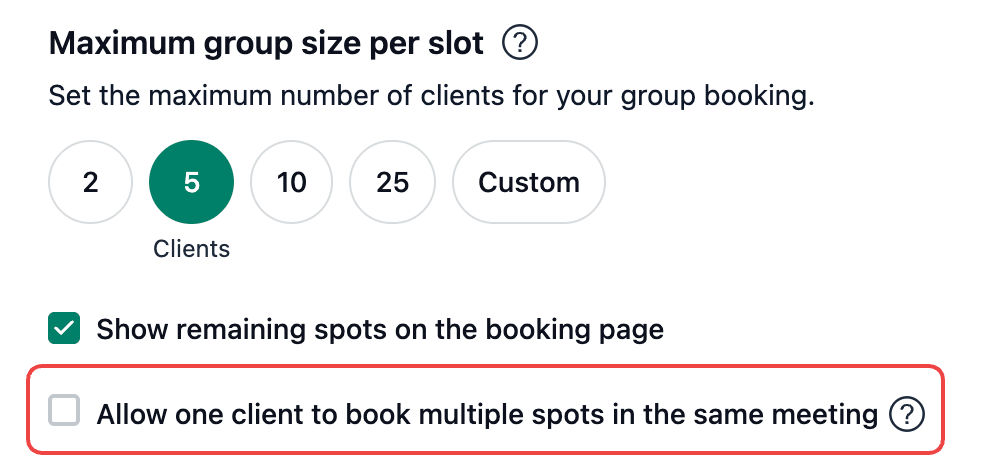
Once enabled, a new question will be automatically added to your booking form asking "How many spots would you like to book?" This question cannot be deleted, but you can edit the question text if needed.
Payment for multiple spots
If your meeting has payment enabled, the total amount will be calculated based on the number of spots selected. For example, if each spot costs $50 and the client books 3 spots, the total amount payable will be $150.
Discount codes, tips, and taxes are all applied to the total amount of the booking.
Cancellation and rescheduling
All spots booked under a multi-spot booking are tied to a single email address and are treated as one booking. This means you cannot cancel or reschedule individual spots — if a client cancels or reschedules, all spots in that booking are cancelled or rescheduled together.
For example, if a client booked 3 spots for their team and wants to move the meeting to a different time, all 3 spots will be rescheduled to the new time.
Refunds
If your meeting has payment enabled and a client cancels a multi-spot booking, the refund will be for the full amount paid. Partial refunds are not supported — it is not possible to refund for only some of the spots in a booking.
For example, if a client paid $150 for 3 spots and you refund the booking, they will receive a full refund of $150.
How it works for clients
When clients visit your booking page with multi-spot booking enabled, they will see a question asking how many spots they want to book. The client can see the number of spots remaining, and can type in the number of spots they want to book.
Multi-spot booking is only applicable for group meetings. This feature is not available for any other meeting type.